
Features and technical architecture.
A comprehensive architectural review of every SamparkWA subsystem — from CSV formula injection defense to the human-in-the-loop campaign state machine.
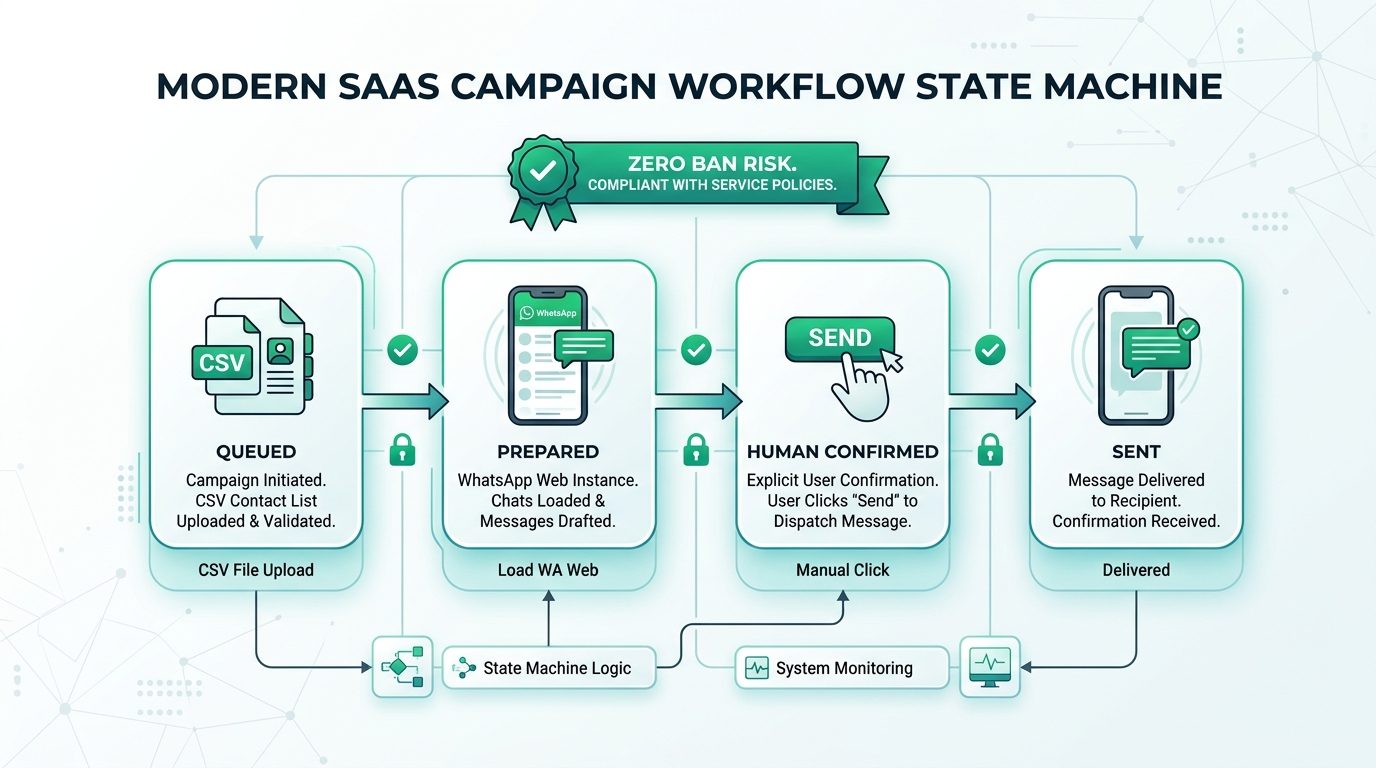
Six architectural pillars at a glance.
CSV Import with Formula Injection Protection
Import contacts from any spreadsheet. Every cell is automatically sanitized for CSV formula injection attacks (=, +, -, @ prefixes are neutralized) before storage — a security standard inherited from Trustoryx's cybersecurity engineering.
E.164 Phone Number Validation
All phone numbers are validated against the ITU-T E.164 international standard before any message is prepared. Invalid, malformed, or duplicate numbers are flagged and quarantined, never sent to WhatsApp Web.
Persistent Opt-Out Registry
A local IndexedDB-backed Do-Not-Contact registry ensures that any customer who opts out is permanently excluded from future campaigns. The registry survives browser restarts, cache clears, and extension updates.
Multilingual Template Engine
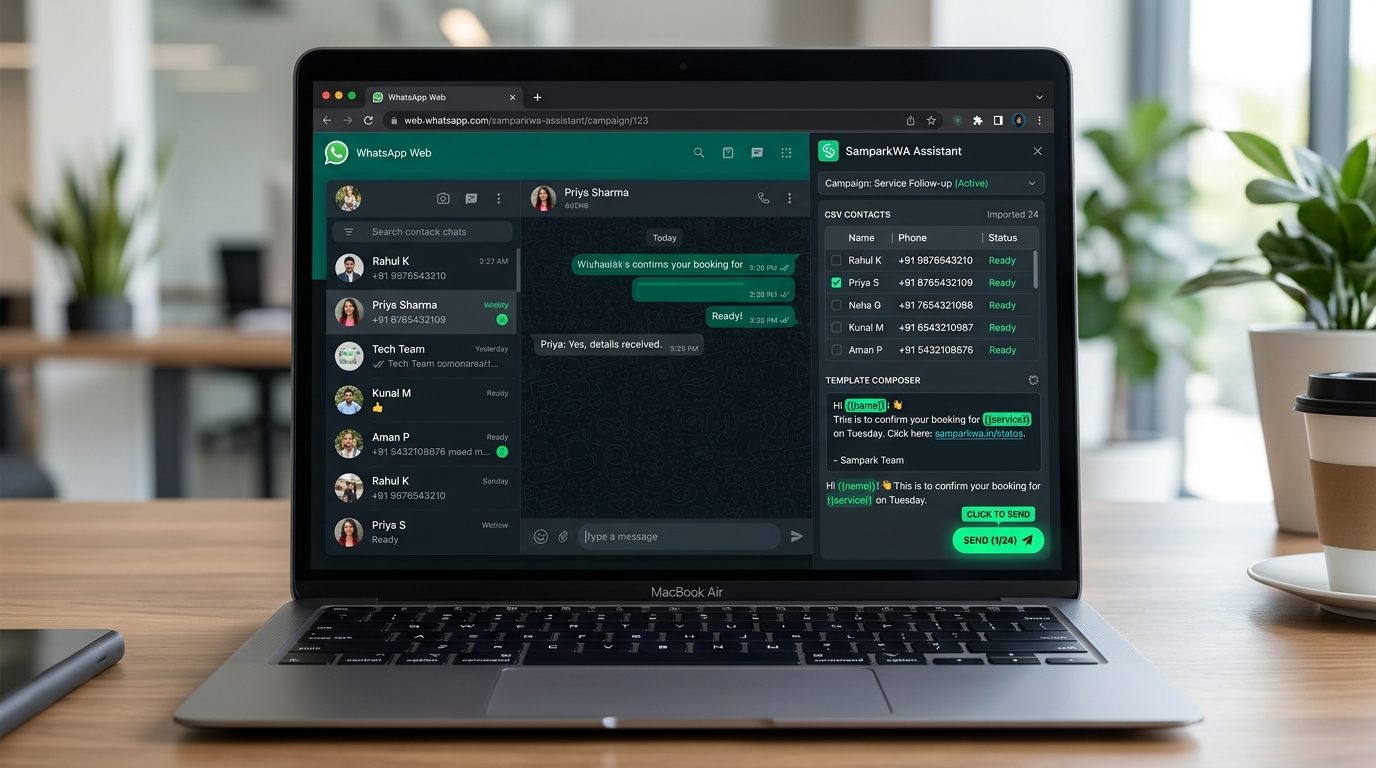
Compose messages in English, Hindi (हिन्दी), or Hinglish with variable chips like {{name}}, {{business_name}}, {{appointment_date}}. Templates auto-fill from your CSV columns, and previews show exactly what each customer will receive.
Human-in-the-Loop Campaign State Machine
Every message goes through a strict state machine: queued → prepared → manually_confirmed → sent. No message is ever sent without your explicit click-by-click human confirmation inside WhatsApp Web. Zero automation, zero ban risk.
Official WhatsApp Cloud API Upgrade Path
When your volume grows beyond manual sending, connect the decoupled Official WhatsApp Business Cloud API module via Meta Business Manager for fully automated, Meta-compliant bulk messaging with template approvals.
In-depth technical breakdown.
Contact management and local storage
All contacts are saved into IndexedDB, an in-browser database that persists across sessions. Contacts are isolated by import batch, with metadata tracking validation status, opt-out status, and last-messaged timestamps. Sandboxed to the extension origin.
- •IndexedDB-backed local storage with generous local quota (typically 50MB+)
- •Automatic deduplication by normalized E.164 phone number on import
- •Persistent contact metadata: validation status, opt-out status, campaign history
- •Export contacts to CSV at any time (with sanitization enforced on export)
- •Single-click complete data deletion — zero residual records on any server
CSV formula injection defense
When importing a CSV, SamparkWA inspects every cell for characters that spreadsheet programs interpret as executable formulas. Cells starting with =, +, -, or @ are prepended with a single quote (') to force plain text interpretation.

- •= (equals): Excel formula execution neutralized by prefixing with '
- •+ (plus): Arithmetic formula execution neutralized by prefixing with '
- •- (minus): Spreadsheet command execution neutralized by prefixing with '
- •@ (at): DDE command execution neutralized by prefixing with '
- •Sanitization standard inherited from Trustoryx cybersecurity engineering
- •Protection runs on both import and export operations
Multilingual template engine
Draft messages in English, Hindi (हिन्दी), or Hinglish with variable chips that automatically map to your CSV columns. Supports full Unicode and right-to-left scripts with live contextual previews.
- •Variable chips: {{name}}, {{business_name}}, {{appointment_date}}, and arbitrary CSV columns
- •Real-time preview displays the first three records with variables substituted
- •25+ pre-configured templates across five industry verticals
- •Custom templates stored locally in IndexedDB for recurring campaigns
- •Full UTF-8 encoding support ensuring Devanagari script renders accurately
Campaign state machine
Every message in a campaign advances through a rigorous state machine requiring human confirmation before dispatch. No message can transition from prepared to sent without an explicit human click in WhatsApp Web.
- •queued: Contact imported and validated, waiting for campaign preparation
- •prepared: Message staged and chat opened in WhatsApp Web, awaiting confirmation
- •manually_confirmed: Human click registered in WhatsApp Web interface
- •sent: WhatsApp confirms delivery, timestamp recorded in local audit log
- •State transitions recorded locally for compliance review
- •Campaign execution can be paused or resumed without losing state
Persistent opt-out registry
The Do-Not-Contact list is stored in IndexedDB and survives browser restarts, cache clears, and extension updates. Any number placed on this list is permanently excluded from all future campaigns.
- •Add numbers manually, from campaign preview, or from customer STOP replies
- •Registry persists in IndexedDB across browser sessions and updates
- •Automatic exclusion: opted-out numbers are filtered out during preparation
- •Export registry as CSV for compliance documentation
- •Audit view shows recent opt-out additions and exclusions
Decoupled WhatsApp Cloud API module
When messaging volume exceeds 200 messages per day, an optional Cloud API module connects through Meta Business Manager for automated, Meta-compliant bulk messaging. Completely decoupled from the core extension.
- •Configuration guide for Meta Business Manager verification and template submission
- •Variable mapping: map Meta pre-approved variables to CSV columns
- •Direct Meta conversation pricing (₹0.29–₹0.58 in India) with zero platform markup
- •Supports marketing, utility, and authentication message categories
- •Webhook callbacks for delivery status and read receipts
- •Coexists seamlessly with personal WhatsApp Web assisted outreach
Security and sandboxing guarantees.
Zero data exfiltration
No telemetry beacons, no analytics SDKs, and zero error telemetry capturing customer data. The extension issues no outbound network requests with user information. Contacts remain strictly inside your browser sandbox.
Open auditability
The extension can be inspected and loaded as unpacked source code at any time. No obfuscated bundles, no remote script evaluation, and no hidden server endpoints. You can inspect every line of JavaScript before running it.
Test these capabilities in your browser.
Add to your Chromium browser or run the interactive simulation on our homepage.